---
title: Understanding Garmin GPS Data in Labfront
description: This article details how the GPS data is presented in the downloadable data files via the Labfront platform, and how to interpret it.
---
[Skip to content](https://help.labfront.com/garmin-gps-data-defined#main-content)
[Contact Support](https://help.labfront.com/kb-tickets/new?hsLang=en)
[](https://www.labfront.com)
- [Sign In](https://app.labfront.com/)
- [Back to Website](https://www.labfront.com/)
Open main navigation
Close main navigation
- [Sign In](https://app.labfront.com/)
- [Back to Website](https://www.labfront.com/)
- [Contact Support](https://help.labfront.com/kb-tickets/new)
How can we help you?
- There are no suggestions because the search field is empty.
1. [Help Center](https://help.labfront.com/?hsLang=en)
2. [Data Metrics and Analysis](https://help.labfront.com/data-metrics-and-analysis?hsLang=en)
3. [Data Metrics](https://help.labfront.com/data-metrics-and-analysis?hsLang=en#data-metrics)
# Understanding Garmin GPS Data in Labfront
## Garmin GPS data can be used to track and analyze participant activities. This article details how the Garmin GPS data is presented in Labfront, and how to interpret it.
#### **- 👨🔬 For Researchers - **
Garmin GPS data can be found in the *garmin-connect-activity-details-sample, garmin-connect-activity-summary,* and *garmin-connect-activity-details-summary files in Labfront. *
### Key Metrics Explained
Garmin GPS data includes multiple duration metrics, geolocation coordinates, and movement statistics. Here’s what each key variable means:
#### ⏰ Duration Metrics
- **clockDurationInMs**: Total time from the start to the end of the activity, including all pauses and stops.
- **timerDurationInMs**: Active time recorded by the timer, excluding paused intervals.
- **movingDurationInMs**: Time spent actively moving, excluding periods of inactivity even if the timer is running.
**Sample Data**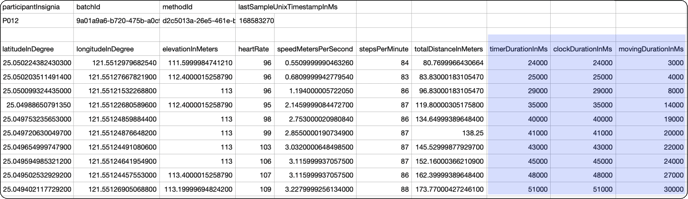
**Example Scenario**
Imagine a participant goes for a run:
- Starts Timer: 12:00 PM.
- Pauses Timer: 12:30 PM for 5 minutes (chatting with a friend).
- Stops Moving: 12:40 PM for 2 minutes (traffic signal).
- Ends Timer: 1:00 PM.
Then, **clockDurationInMS** = 3600000 , **timerDurationInMS** = 3300000, and **movingDurationInMS** = 3180000
**Note**
In all cases, movingDurationInMs <= timerDurationInMs <= clockDurationInMs.
#### 📍Geolocation Variables
Garmin GPS data tracks the exact location and movement path during an activity.
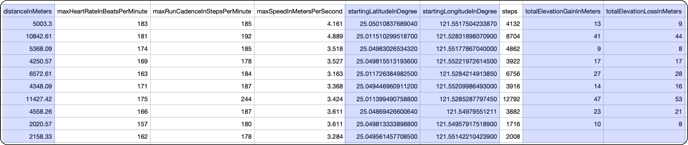
- **startingLatitudeInDegree** & **startingLongitudeInDegree**: Coordinates marking the starting point of the activity.
- **distanceInMeters**: Total distance traveled.
- **totalElevationGainInMeters** & **totalElevationLossInMeters**: Changes in elevation throughout the activity.
#### 👣 Movement and Speed Variables
Garmin provides detailed insights into participant movement.
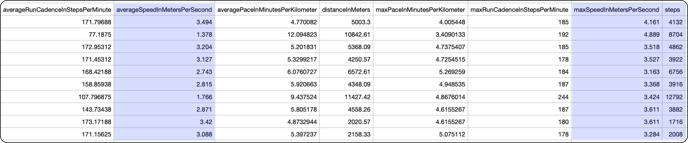
- **steps**: Number of steps taken during the activity.
- **averageSpeedInMetersPerSecond**: Average speed over the activity duration.
- **maxSpeedInMetersPerSecond**: Highest recorded speed during the activity.
* *
### **How to Activate and Record GPS Data**
For accurate data collection, participants must manually start and stop the activity on their Garmin device:
- [How to start/stop an activity on vivosmart 5](https://www8.garmin.com/manuals/webhelp/GUID-8674F17E-62B2-48DE-927A-251611664658/EN-US/GUID-601893FF-332F-4D2B-91B7-285AD9B99A9B.html)
- [How to start/stop an activity on Venu 3](https://www8.garmin.com/manuals/webhelp/GUID-9CC4A873-E034-4A06-B2E0-636DCFE760EE/EN-US/GUID-90B3EF66-C7DC-4BB5-A1A3-C07E1E9E7A57.html)
**Important**
GPS data collection is active only during logged activities. If participants forget to start the activity, no GPS data will be recorded. To activate GPS tracking, participants must manually select "start activity" and "end activity" on the watch.
### **How Researchers Can Use Garmin GPS Data**
1. **Monitor Adherence:** Use geolocation and movement metrics to ensure participants follow activity protocols.
2. **Analyze Trends:** Combine distance, speed, and elevation metrics to evaluate performance or fitness improvements.
3. **Visualize Data:** Map GPS coordinates to visualize activity paths or calculate additional metrics like elevation profiles.
### **Need Help?**
If you have questions or need assistance with Garmin GPS data in Labfront, please [reach out to our support team.](mailto:support@labfront.com)
- [Getting Started](https://help.labfront.com/getting-started?hsLang=en#main-content)
- [Getting Started FAQs](https://help.labfront.com/getting-started?hsLang=en#getting-started-faqs)
- [Getting Started with Labfront Guide for Researchers](https://help.labfront.com/getting-started?hsLang=en#getting-started-with-labfront-guide-for-researchers)
- [Using Labfront](https://help.labfront.com/using-labfront?hsLang=en#main-content)
- [Project Creation, Setup and Edits](https://help.labfront.com/using-labfront?hsLang=en#project-creation-setup-and-edits)
- [Workspace](https://help.labfront.com/using-labfront?hsLang=en#workspace)
- [Participant Management](https://help.labfront.com/using-labfront?hsLang=en#participant-management)
- [Participant App](https://help.labfront.com/using-labfront?hsLang=en#participant-app)
- [Users and Accounts](https://help.labfront.com/using-labfront?hsLang=en#users-and-accounts)
- [Participant Experience](https://help.labfront.com/using-labfront?hsLang=en#participant-experience)
- [Garmin](https://help.labfront.com/garmin?hsLang=en#main-content)
- [General](https://help.labfront.com/garmin?hsLang=en#general)
- [Using Device](https://help.labfront.com/garmin?hsLang=en#using-device)
- [Movesense](https://help.labfront.com/movesense?hsLang=en#main-content)
- [General](https://help.labfront.com/movesense?hsLang=en#general)
- [Using Device](https://help.labfront.com/movesense?hsLang=en#using-device)
- [Data](https://help.labfront.com/movesense?hsLang=en#data)
- [Dexcom](https://help.labfront.com/dexcom?hsLang=en)
- [Data Metrics and Analysis](https://help.labfront.com/data-metrics-and-analysis?hsLang=en#main-content)
- [Data Management](https://help.labfront.com/data-metrics-and-analysis?hsLang=en#data-management)
- [Data Metrics](https://help.labfront.com/data-metrics-and-analysis?hsLang=en#data-metrics)
- [Data Analytics](https://help.labfront.com/data-metrics-and-analysis?hsLang=en#data-analytics)
- [Analytics Reports](https://help.labfront.com/data-metrics-and-analysis?hsLang=en#analytics-reports)
- [Pricing, Plans and Payment](https://help.labfront.com/pricing-plans-and-payment?hsLang=en)
- [Legal and Security](https://help.labfront.com/legal-and-security?hsLang=en)
- [Participant Resources](https://help.labfront.com/participant-resources?hsLang=en#main-content)
- [Participant Guides](https://help.labfront.com/participant-resources?hsLang=en#participant-guides)
- [Supporting Resources](https://help.labfront.com/supporting-resources?hsLang=en#main-content)
- [Grants, Funding and IRB Applications](https://help.labfront.com/supporting-resources?hsLang=en#grants-funding-and-irb-applications)
[](https://www.labfront.com)
Boston, MA, USA
[mailto:support@labfront.com](mailto:support@labfront.com)
Copyright © 2026, Labfront