---
title: Garmin Overview
description: Why should you consider using Garmin wearables in your research? How do they work with Labfront? This article provides a thorough overview of everything Garmin for researchers.
---
[Skip to content](https://help.labfront.com/garmin-overview#main-content)
[Contact Support](https://help.labfront.com/kb-tickets/new?hsLang=en)
[](https://www.labfront.com)
- [Sign In](https://app.labfront.com/)
- [Back to Website](https://www.labfront.com/)
Open main navigation
Close main navigation
- [Sign In](https://app.labfront.com/)
- [Back to Website](https://www.labfront.com/)
- [Contact Support](https://help.labfront.com/kb-tickets/new)
How can we help you?
- There are no suggestions because the search field is empty.
1. [Help Center](https://help.labfront.com/?hsLang=en)
2. [Garmin](https://help.labfront.com/garmin?hsLang=en)
3. [General](https://help.labfront.com/garmin?hsLang=en#general)
# Garmin Overview
## Why should you consider using Garmin wearables in your research? How do they work with Labfront? This article provides a thorough overview of everything Garmin for researchers.
| ### Table of Contents 1. [**About Garmin**](https://help.labfront.com/garmin-overview#about-garmin) 1. Use Cases 2. Published Studies 3. Buying Devices 2. [**Using Garmin devices with Labfront**](https://help.labfront.com/garmin-overview#garmin-with-labfront) 1. Researchers 2. Participants 3. Case Studies 3. [**Garmin Data**](https://help.labfront.com/garmin-overview#garmin-data) 1. Data Types 2. Data Format 4. [**Additional Garmin Resources**](https://help.labfront.com/garmin-overview#resources) 5. [**FAQs**](https://help.labfront.com/garmin-overview#faq) |
| --- |
### **1. About Garmin**
Since the early 2000s, Garmin has been producing wrist wearables and has established itself as a trusted industry leader. Your research goals will be easier to achieve with products that support researchers across all disciplines, whether you need sleep staging, body composition, respiration rate, blood pressure, oxygen saturation, or granular interbeat interval data.
#### 1.1 Use Cases
**Wearable Wristbands**
Garmin smartwatches are great for [continuous background](https://help.labfront.com/data-streaming-vs-data-logging?hsLang=en) real-world data capture as they are unobtrusive and can be worn 24/7.
- Dissect how sleep and sedentary habits affect mental health
- Track the efficacy of a certain intervention with more context data
**Blood Pressure Monitor**
The Index™ Smart Blood Pressure Monitor can be used to understand how blood pressure responds to different interventions or environmental factors.
- Study the effectiveness of a new medication for hypertension by tracking changes in blood pressure over several weeks or months.
- Track the impact of environmental factors such as air pollution or noise exposure on blood pressure.
**Smart Scale**
With the Index™ S2’s ability to measure not only weight but also body composition, including body fat and muscle mass, the scale provides researchers with a wealth of information that was previously unavailable.
- Examine the effectiveness of a weight loss program by tracking changes in not just weight but overall body composition over time.
- Monitor the impact of a particular medication on muscle mass in patients with a chronic illness.
**Note**
Garmin's Third-Party Studies Database has many examples of how Garmin devices are being used in research. [Check it out→](https://www.garmin.com/en-US/garmin-health-third-party-studies-overview/)
#### 1.2 Published Studies
Garmin devices are being used in research to measure steps, heart rate, sleep, and more. [Garmin's Health Research Database](https://www.garmin.com/en-US/garmin-health-third-party-studies-overview/) has a comprehensive collection of 1000+ published third-party studies using Garmin devices.
#### 1.3 Buying Devices
While we don't currently provide the option to purchase Garmin devices from us directly, we *do* offer an exclusive discount on Garmin devices to Labfront customers. The amount of discount depends on the device type and quantity, but it is usually ~20%. Get in touch with us at [hello@labfront.com](mailto:hello@labfront.com) if you're interested in taking advantage of this offer.
**Recommendation**
For the most affordable and compact device, we suggest using the Garmin vívosmart 5. If you’d like a bigger display, longer battery life, and more sensors, then we recommend using the Garmin Venu® 3.
⬆️ [Back to Table of Contents](https://help.labfront.com/garmin-overview#table-of-contents)
### **2. Using Garmin Devices with Labfront**
Labfront is compatible with a wide range of Garmin devices, including wrist-worn wearables, a smart scale, and a blood pressure monitor. You can see a full list of compatible devices in the table below:
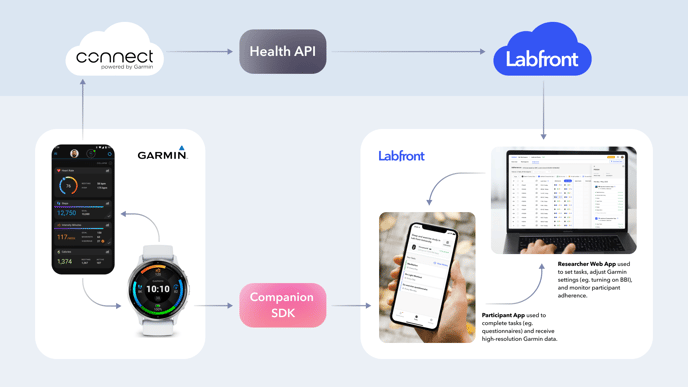
What is special about Labfront is that because we have a [partnership with Garmin](https://t.sidekickopen04.com/s3t/c/5/f18dQhb0S7kF8bGn5nW770V9l1jkhflN4kC_d_pLnS0VNK2sc1V16zVW1h9tVP9frrxTf197v5Y04?te=W3R5hFj4cm2zwW4mKLS-3ZSy2zW49PGNF1JxwY5W1LvFJt3NC0HtW3C89PV41YsqyW41QPRB3zgDyrW41n_t53ZY69HF43WfylSZ_r1&si=8000000020066412&pi=3c5407a0-683f-42d3-a3cb-59243d55421c), we have the ability to configure Garmin devices using the Garmin Health SDKs to increase the sensor resolution, allowing researchers to capture higher-resolution data than normally collected by Garmin.
This means that you can capture [beat-to-beat or interbeat interval data](https://www.labfront.com/article/interbeat-interval) and derive valuable metrics like [heart rate variability](https://www.labfront.com/article/hrv-in-research).
#### 2.1 Researchers
To capture physiological data from Garmin devices, simply [add a Garmin device](https://help.labfront.com/add-a-device?hsLang=en)to your Labfront project and [choose the data source](https://help.labfront.com/choosing-your-garmin-data?hsLang=en) you want to use to collect data.
.png?width=688&height=446&name=Add%20Devices%20(1).png)
#### 2.2 Participants
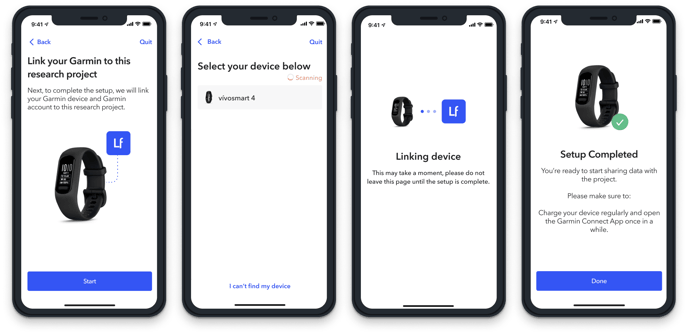
Participants will [set up the device](https://help.labfront.com/set-up-wearable-device?hsLang=en) on the Labfront app in a few easy steps once they join the project.
Then they will wear the device and open the Labfront app regularly to [sync and upload their data](https://help.labfront.com/sync-data?hsLang=en).
[Learn more about the participant experience→](https://help.labfront.com/participant-experience-researcher-guide?hsLang=en)
#### 2.3 Case Studies
You can check out several studies using Garmin smartwatches and Labfront on our [Case Studies](https://www.labfront.com/case-studies) page, including:
- [Physiotherapy and Cystic Fibrosis Study](https://t.sidekickopen04.com/s3t/c/5/f18dQhb0S7kF8bGn5nW770V9l1jkhflN4kC_d_pLnS0VNK2sc1V16zVW1h9tVP9frrxTf197v5Y04?te=W3R5hFj4cm2zwW4mKLS-3ZSy2zW49PGNF1JxwY5W1Lw2c13JF5lnW4hDM073FgFpTW3SYFS03SYlqGW4cKKSr49KwsNf3zgCH004&si=8000000020066412&pi=3c5407a0-683f-42d3-a3cb-59243d55421c)
- [Frontline Healthcare Worker Resiliency Study](https://t.sidekickopen04.com/s3t/c/5/f18dQhb0S7kF8bGn5nW770V9l1jkhflN4kC_d_pLnS0VNK2sc1V16zVW1h9tVP9frrxTf197v5Y04?te=W3R5hFj4cm2zwW4mKLS-3ZSy2zW49PGNF1JxwY5W1Lw2c13JF5lnW4hDM073Q_0SKW4fHRv549KpkfW43Wgqt49hbPNW4cKKfm3K76Py0&si=8000000020066412&pi=3c5407a0-683f-42d3-a3cb-59243d55421c)
- [Physical Activity and Teens with T1D](https://t.sidekickopen04.com/s3t/c/5/f18dQhb0S7kF8bGn5nW770V9l1jkhflN4kC_d_pLnS0VNK2sc1V16zVW1h9tVP9frrxTf197v5Y04?te=W3R5hFj4cm2zwW4mKLS-3ZSy2zW49PGNF1JxwY5W1Lw2c13JF5lnW4hDM0745PHp_W3SYLpF1Gy6qWW3T4G6H4r4_RFW3GGxwV3z7ZfF3b732&si=8000000020066412&pi=3c5407a0-683f-42d3-a3cb-59243d55421c)
- [Stanford WELL for Life Wearable Pilot Study](https://www.labfront.com/case-study/epidemiological-research)
⬆️ [Back to Table of Contents](https://help.labfront.com/garmin-overview#table-of-contents)
### 3. Garmin Data
#### 3.1 Data Types
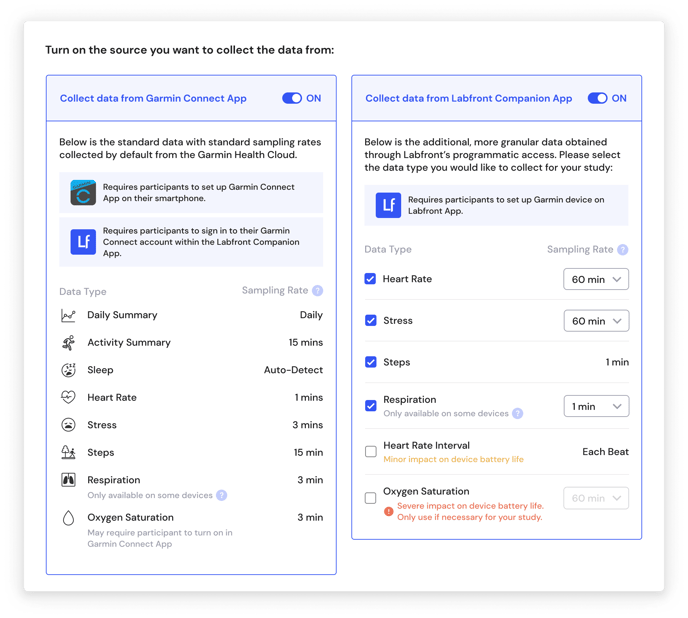
Here is an overview of the types of data you can collect using Garmin devices. The data types and sampling rates will vary depending on which source is used for data collection--Garmin Connect, Labfront Companion, or both.
%20(1).png?width=688&height=688&name=Data%20Source%20Comparison%20Chart%20(2000%20x%202000%20px)%20(1).png)
[Learn more about Garmin data sources and how they impact participant experience→](https://help.labfront.com/choosing-your-garmin-data?hsLang=en)
#### 3.2 Data Format
Learn how Labfront conveniently separates and organizes data into CSV files in this [Data Overview article](https://help.labfront.com/how-data-is-organized?hsLang=en).
⬆️ [Back to Table of Contents](https://help.labfront.com/garmin-overview#table-of-contents)
### 4. Garmin Resources
For additional information on Garmin Health and Garmin wearables, we recommended taking a look at the following resources:
- [Garmin Health](https://www.garmin.com/en-US/health/)
- [Garmin Health 3rd Party Studies](https://www.garmin.com/en-US/garmin-health-third-party-studies-overview/)
- [Garmin Health SDK Overview](https://developer.garmin.com/health-sdk/overview/)
- [Garmin Health Blog](https://www.garmin.com/en-US/blog/category/health/)
- [Garmin Wearables](https://www.garmin.com/en-US/c/wearables-smartwatches/)
- [Garmin Wearables Wear and Care Tips](https://www.garmin.com/en-US/watch-fit-and-care/)
⬆️ [Back to Table of Contents](https://help.labfront.com/garmin-overview#table-of-contents)
### 5. FAQs
#### **Is there a specific Garmin wearable device recommended to use with Labfront?**
For the most affordable and compact device, we suggest using the Garmin vívosmart 5. If you’d like a bigger display, longer battery life, and more sensors, then we recommend using the Garmin Venu® series.
#### **How accurate are Garmin devices for measuring heart rate, Sp02, or other physiological data?**
Garmin devices have been used successfully for physiological data collection across many different types of research projects, including clinical trials. As with any wearable sensor, the quality of data collection depends on the amount of extra signal noise. Device fit, device usage, and motion intensity all affect the resulting accuracy.
- [Visit this page](https://support.garmin.com/en-US/?faq=xQwjQjzUew4BF1GYcusE59) for tips and advice about getting the best performance for heart rate accuracy.
- For details about pulse ox and heart rate accuracy, please [read this information](https://www.garmin.com/en-US/legal/atdisclaimer/).
- For further tips about getting the best performance out of your Garmin device, please visit [Garmin Support.](https://support.garmin.com/)
#### **What are some best practices to help optimize for accuracy from Garmin wearables?**
Many factors may affect the accuracy of your wearable device for measuring physiological data, including the device fit and level of activity/motion. For this reason, we recommend the following tips:
1. **Fit matters:** Make sure all participants know how to correctly wear said wearable device.
2. **More samples, more insights**: Collect extra samples and average them to get more accurate representations.
3. **Less movement, higher accuracy**: Try to take measurements during low activity periods when possible, such as when one is sitting at a desk or sleeping.
#### **Is Labfront compatible with non-Garmin devices?**
Yes, Labfront is compatible with Dexcom CGMs as well as Movesense devices for IMU/ECG data. The [latest list of compatible devices](https://www.labfront.com/compatible-devices) is available on our website. We do update this list from time to time, so if you are interested in a specific device that is not listed on the website, then please reach out to [hello@labfront.com](mailto:hello@labfront.com)
⬆️ [Back to Table of Contents](https://help.labfront.com/garmin-overview#table-of-contents)
---
#### 🔎 Can't find the answer you're looking for?
Check out our [top FAQs](https://help.labfront.com/top-faqs?hsLang=en) or get in touch at [support@labfront.com](mailto:support@labfront.com).
- [Getting Started](https://help.labfront.com/getting-started?hsLang=en#main-content)
- [Getting Started FAQs](https://help.labfront.com/getting-started?hsLang=en#getting-started-faqs)
- [Getting Started with Labfront Guide for Researchers](https://help.labfront.com/getting-started?hsLang=en#getting-started-with-labfront-guide-for-researchers)
- [Using Labfront](https://help.labfront.com/using-labfront?hsLang=en#main-content)
- [Project Creation, Setup and Edits](https://help.labfront.com/using-labfront?hsLang=en#project-creation-setup-and-edits)
- [Workspace](https://help.labfront.com/using-labfront?hsLang=en#workspace)
- [Participant Management](https://help.labfront.com/using-labfront?hsLang=en#participant-management)
- [Participant App](https://help.labfront.com/using-labfront?hsLang=en#participant-app)
- [Users and Accounts](https://help.labfront.com/using-labfront?hsLang=en#users-and-accounts)
- [Participant Experience](https://help.labfront.com/using-labfront?hsLang=en#participant-experience)
- [Garmin](https://help.labfront.com/garmin?hsLang=en#main-content)
- [General](https://help.labfront.com/garmin?hsLang=en#general)
- [Using Device](https://help.labfront.com/garmin?hsLang=en#using-device)
- [Movesense](https://help.labfront.com/movesense?hsLang=en#main-content)
- [General](https://help.labfront.com/movesense?hsLang=en#general)
- [Using Device](https://help.labfront.com/movesense?hsLang=en#using-device)
- [Data](https://help.labfront.com/movesense?hsLang=en#data)
- [Dexcom](https://help.labfront.com/dexcom?hsLang=en)
- [Data Metrics and Analysis](https://help.labfront.com/data-metrics-and-analysis?hsLang=en#main-content)
- [Data Management](https://help.labfront.com/data-metrics-and-analysis?hsLang=en#data-management)
- [Data Metrics](https://help.labfront.com/data-metrics-and-analysis?hsLang=en#data-metrics)
- [Data Analytics](https://help.labfront.com/data-metrics-and-analysis?hsLang=en#data-analytics)
- [Analytics Reports](https://help.labfront.com/data-metrics-and-analysis?hsLang=en#analytics-reports)
- [Pricing, Plans and Payment](https://help.labfront.com/pricing-plans-and-payment?hsLang=en)
- [Legal and Security](https://help.labfront.com/legal-and-security?hsLang=en)
- [Participant Resources](https://help.labfront.com/participant-resources?hsLang=en#main-content)
- [Participant Guides](https://help.labfront.com/participant-resources?hsLang=en#participant-guides)
- [Supporting Resources](https://help.labfront.com/supporting-resources?hsLang=en#main-content)
- [Grants, Funding and IRB Applications](https://help.labfront.com/supporting-resources?hsLang=en#grants-funding-and-irb-applications)
[](https://www.labfront.com)
Boston, MA, USA
[mailto:support@labfront.com](mailto:support@labfront.com)
Copyright © 2026, Labfront