---
title: Connect Participants to Your Project
description: The final step to running your project is to add participants to the project. This can be done by generating invite codes on the Labfront platform.
---
[Skip to content](https://help.labfront.com/invite-participants#main-content)
[Contact Support](https://help.labfront.com/kb-tickets/new?hsLang=en)
[](https://www.labfront.com)
- [Sign In](https://app.labfront.com/)
- [Back to Website](https://www.labfront.com/)
Open main navigation
Close main navigation
- [Sign In](https://app.labfront.com/)
- [Back to Website](https://www.labfront.com/)
- [Contact Support](https://help.labfront.com/kb-tickets/new)
How can we help you?
- There are no suggestions because the search field is empty.
1. [Help Center](https://help.labfront.com/?hsLang=en)
2. [Using Labfront](https://help.labfront.com/using-labfront?hsLang=en)
3. [Participant Management](https://help.labfront.com/using-labfront?hsLang=en#participant-management)
# Connect Participants to Your Project
## Once your app is published, you can add participants to your project and start capturing data.
---
In this article:
- How to add participants to your project
- Invite codes (including how to regenerate them)
- Participant management FAQs
---
### Connecting Participants to Project
1\. To add Participants to your project, go to the **Participants** tab in your workspace and click the **Add Participant** button.

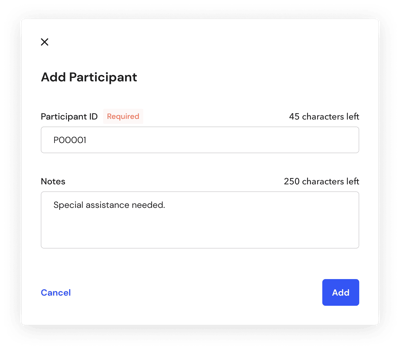
2. Enter a **Participant ID**, using a unique and anonymous identifier. You'll also have the option to add **Notes**.
##### Important
Please do not use personally identifiable information to identify each of your participants. This should be an identifier that only you as a researcher can use to uniquely identify each participant.
3\. A unique 6-character **Invite Code** will automatically be generated for each participant to access the app you created. Distribute this invite code to the participant via email, text message, etc. Each participant must enter the code into the Labfront Companion app to connect them to your project. Once they do so, their **Status** will update from *Not Yet Joined* to *Joined.*
**
This code is one-time-use only. If a participant signs out of the application you can generate new codes by clicking **Regenerate.**
##### Note
Each participant requires their own unique Labfront account (slot), even if sharing a device. Reusing accounts can lead to data being overwritten or mixed.
You can view your available participant slots at the top of your dashboard. Tester accounts support up to 5 participants. To add more, upgrade to a [Basic or Advanced Account](https://www.labfront.com/pricing). Contact [support@labfront.com](mailto:support@labfront.com) and we'll be happy to help.
4\. Ask participants to follow the steps below to join your project:
- Download the **Labfront Companion** app, available for download on [Android](https://play.google.com/store/apps/details?id=com.labfront.production) and [iOS](https://apps.apple.com/us/app/labfront-companion/id1626813782)
- Enter their **Invite Code** on the Labfront app
- Follow the app instructions to set up their wearable device
The participant's experience of setting up the device will vary according to your study protocol.
Learn more about [Onboarding Participants](https://help.labfront.com/onboard-participants?hsLang=en) ➝
---
### **Participant Management FAQs**
#### **How often do participants need to open the Labfront Companion app?**
We recommend opening the Labfront Companion app at least once per day to sync participant data.
#### **Can I monitor participants to see if participants are collecting data and completing tasks?**
Yes, the Adherence tab of the Dashboard enables you to see if participants are collecting data and have completed tasks. You can also view a 7-day summary on the Overview page.
#### **How do I communicate with participants?**
We recommend using Labfront's [notifications](https://help.labfront.com/push-notifications?hsLang=en) feature to communicate with participants.
#### Can I reuse a participant account (slot) for different users?
No, once data collection is complete, that participant account should not be reused. Create a new Labfront participant account for each participant to keep data separate. Sharing accounts can cause data to be mixed or unreliable.
To avoid these issues, the best practice is:
- Create a new Labfront participant account for each new participant.
- Connect the participant’s Garmin Connect account to that new Labfront account.
- Re-use the Garmin device if needed (after resetting it), but never re-use a participant account.
#### **My participant's invite code isn't working. What should I do?**
You can click **Regenerate** on the **Participants** tab of the Dashboard. [View this image](https://help.labfront.com/invite-participants#invite-code) to see where to find it.
- [Getting Started](https://help.labfront.com/getting-started?hsLang=en#main-content)
- [Getting Started FAQs](https://help.labfront.com/getting-started?hsLang=en#getting-started-faqs)
- [Getting Started with Labfront Guide for Researchers](https://help.labfront.com/getting-started?hsLang=en#getting-started-with-labfront-guide-for-researchers)
- [Using Labfront](https://help.labfront.com/using-labfront?hsLang=en#main-content)
- [Project Creation, Setup and Edits](https://help.labfront.com/using-labfront?hsLang=en#project-creation-setup-and-edits)
- [Workspace](https://help.labfront.com/using-labfront?hsLang=en#workspace)
- [Participant Management](https://help.labfront.com/using-labfront?hsLang=en#participant-management)
- [Participant App](https://help.labfront.com/using-labfront?hsLang=en#participant-app)
- [Users and Accounts](https://help.labfront.com/using-labfront?hsLang=en#users-and-accounts)
- [Participant Experience](https://help.labfront.com/using-labfront?hsLang=en#participant-experience)
- [Garmin](https://help.labfront.com/garmin?hsLang=en#main-content)
- [General](https://help.labfront.com/garmin?hsLang=en#general)
- [Using Device](https://help.labfront.com/garmin?hsLang=en#using-device)
- [Movesense](https://help.labfront.com/movesense?hsLang=en#main-content)
- [General](https://help.labfront.com/movesense?hsLang=en#general)
- [Using Device](https://help.labfront.com/movesense?hsLang=en#using-device)
- [Data](https://help.labfront.com/movesense?hsLang=en#data)
- [Dexcom](https://help.labfront.com/dexcom?hsLang=en)
- [Data Metrics and Analysis](https://help.labfront.com/data-metrics-and-analysis?hsLang=en#main-content)
- [Data Management](https://help.labfront.com/data-metrics-and-analysis?hsLang=en#data-management)
- [Data Metrics](https://help.labfront.com/data-metrics-and-analysis?hsLang=en#data-metrics)
- [Data Analytics](https://help.labfront.com/data-metrics-and-analysis?hsLang=en#data-analytics)
- [Analytics Reports](https://help.labfront.com/data-metrics-and-analysis?hsLang=en#analytics-reports)
- [Pricing, Plans and Payment](https://help.labfront.com/pricing-plans-and-payment?hsLang=en)
- [Legal and Security](https://help.labfront.com/legal-and-security?hsLang=en)
- [Participant Resources](https://help.labfront.com/participant-resources?hsLang=en#main-content)
- [Participant Guides](https://help.labfront.com/participant-resources?hsLang=en#participant-guides)
- [Supporting Resources](https://help.labfront.com/supporting-resources?hsLang=en#main-content)
- [Grants, Funding and IRB Applications](https://help.labfront.com/supporting-resources?hsLang=en#grants-funding-and-irb-applications)
[](https://www.labfront.com)
Boston, MA, USA
[mailto:support@labfront.com](mailto:support@labfront.com)
Copyright © 2026, Labfront