---
title: Set up Movesense Device
description: This article will take you through the steps of setting up the Movesense device and linking it to your Labfront project.
---
[Skip to content](https://help.labfront.com/setting-up-movesense#main-content)
[Contact Support](https://help.labfront.com/kb-tickets/new?hsLang=en)
[](https://www.labfront.com)
- [Sign In](https://app.labfront.com/)
- [Back to Website](https://www.labfront.com/)
Open main navigation
Close main navigation
- [Sign In](https://app.labfront.com/)
- [Back to Website](https://www.labfront.com/)
- [Contact Support](https://help.labfront.com/kb-tickets/new)
How can we help you?
- There are no suggestions because the search field is empty.
1. [Help Center](https://help.labfront.com/?hsLang=en)
2. [Movesense](https://help.labfront.com/movesense?hsLang=en)
3. [Using Device](https://help.labfront.com/movesense?hsLang=en#using-device)
# Set up Movesense Device
## This article will take you through the steps of setting up the Movesense device and linking it to your Labfront project.
### Setting Up Your Movesense Device
Before linking the Movesense device to your project, make sure your phone's Bluetooth is on and the Movesense is ready to connect.
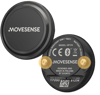
*To "wake up" the device, touch the two metal connectors at the back. When the red LED flashes, the device is ready to connect.*
1. Open the **Labfront Companion **app to enter the project you're connected to. *If you haven't yet downloaded the app and joined a study, [follow the steps outlined here](https://help.labfront.com/install-app-and-join-study?hsLang=en).*
2. You will see **Movesense** at the top of your screen. Click **Start \> Get Started. **The app will search for the device.
3. The paired device should show up during the scan. Select your device by checking the 12-digit serial number on the back. Then click **Link Device**.
4. Pair the device.
.png?width=688&height=882&name=Set%20up%20Movesense%20(1).png)
You can also pair a device through the Labfront Companion Settings.
1. Select  **Settings**
2. **Devices** \> **Movesense** \> **Pair Device**
#### **Congratulations, you're all set 🎉! **
Now that the setup process is complete, participants will only need to open the Labfront Companion app** to complete Movesense Tasks **created by the researcher.
*If pairing is unsuccessful, follow the steps highlighted in the app, and if all else fails, reach out to [support@labfront.com](mailto:support@labfront.com). *
### **📖 Additional Reading**
[Learn more about completing Movesense Tasks](https://help.labfront.com/complete-movesense-task?hsLang=en)
[Movesense Troubleshooting](https://help.labfront.com/movesense-troubleshooting?hsLang=en)
- [Getting Started](https://help.labfront.com/getting-started?hsLang=en#main-content)
- [Getting Started FAQs](https://help.labfront.com/getting-started?hsLang=en#getting-started-faqs)
- [Getting Started with Labfront Guide for Researchers](https://help.labfront.com/getting-started?hsLang=en#getting-started-with-labfront-guide-for-researchers)
- [Using Labfront](https://help.labfront.com/using-labfront?hsLang=en#main-content)
- [Project Creation, Setup and Edits](https://help.labfront.com/using-labfront?hsLang=en#project-creation-setup-and-edits)
- [Workspace](https://help.labfront.com/using-labfront?hsLang=en#workspace)
- [Participant Management](https://help.labfront.com/using-labfront?hsLang=en#participant-management)
- [Participant App](https://help.labfront.com/using-labfront?hsLang=en#participant-app)
- [Users and Accounts](https://help.labfront.com/using-labfront?hsLang=en#users-and-accounts)
- [Participant Experience](https://help.labfront.com/using-labfront?hsLang=en#participant-experience)
- [Garmin](https://help.labfront.com/garmin?hsLang=en#main-content)
- [General](https://help.labfront.com/garmin?hsLang=en#general)
- [Using Device](https://help.labfront.com/garmin?hsLang=en#using-device)
- [Movesense](https://help.labfront.com/movesense?hsLang=en#main-content)
- [General](https://help.labfront.com/movesense?hsLang=en#general)
- [Using Device](https://help.labfront.com/movesense?hsLang=en#using-device)
- [Data](https://help.labfront.com/movesense?hsLang=en#data)
- [Dexcom](https://help.labfront.com/dexcom?hsLang=en)
- [Data Metrics and Analysis](https://help.labfront.com/data-metrics-and-analysis?hsLang=en#main-content)
- [Data Management](https://help.labfront.com/data-metrics-and-analysis?hsLang=en#data-management)
- [Data Metrics](https://help.labfront.com/data-metrics-and-analysis?hsLang=en#data-metrics)
- [Data Analytics](https://help.labfront.com/data-metrics-and-analysis?hsLang=en#data-analytics)
- [Analytics Reports](https://help.labfront.com/data-metrics-and-analysis?hsLang=en#analytics-reports)
- [Pricing, Plans and Payment](https://help.labfront.com/pricing-plans-and-payment?hsLang=en)
- [Legal and Security](https://help.labfront.com/legal-and-security?hsLang=en)
- [Participant Resources](https://help.labfront.com/participant-resources?hsLang=en#main-content)
- [Participant Guides](https://help.labfront.com/participant-resources?hsLang=en#participant-guides)
- [Supporting Resources](https://help.labfront.com/supporting-resources?hsLang=en#main-content)
- [Grants, Funding and IRB Applications](https://help.labfront.com/supporting-resources?hsLang=en#grants-funding-and-irb-applications)
[](https://www.labfront.com)
Boston, MA, USA
[mailto:support@labfront.com](mailto:support@labfront.com)
Copyright © 2026, Labfront