---
title: "Understanding Timestamps in Labfront: Unix Time"
description: This article explains the timestamps in your downloaded Labfront data and shows how to convert data provided in Unix time to local time.
---
[Skip to content](https://help.labfront.com/understanding-timestamps#main-content)
[Contact Support](https://help.labfront.com/kb-tickets/new?hsLang=en)
[](https://www.labfront.com)
- [Sign In](https://app.labfront.com/)
- [Back to Website](https://www.labfront.com/)
Open main navigation
Close main navigation
- [Sign In](https://app.labfront.com/)
- [Back to Website](https://www.labfront.com/)
- [Contact Support](https://help.labfront.com/kb-tickets/new)
How can we help you?
- There are no suggestions because the search field is empty.
1. [Help Center](https://help.labfront.com/?hsLang=en)
2. [Data Metrics and Analysis](https://help.labfront.com/data-metrics-and-analysis?hsLang=en)
3. [Data Management](https://help.labfront.com/data-metrics-and-analysis?hsLang=en#data-management)
# Understanding Timestamps in Labfront: Unix Time
## This article explains the timestamps in your downloaded Labfront data and shows how to convert data provided in Unix time to local time.
---
In this article, we'll cover:
- [Overview of time data in Labfront](https://help.labfront.com/understanding-timestamps#time-data)
- [Explanation of Unix time](https://help.labfront.com/understanding-timestamps#unix-time)
- [How to convert Unix time to local time (with an example)](https://help.labfront.com/understanding-timestamps#converting)
- [Timestamp FAQs](https://help.labfront.com/understanding-timestamps#faq)
---
### **Time Data in Labfront**
When viewing your data in Labfront, you'll see the following variables:
- **timezone -** The geographic region based on the device settings.
- Ex: Asia/Taipei
- **unixTimestampInMs -** The timestamp of the corresponding data type in[Unix time](https://help.labfront.com/understanding-timestamps#unix-time).It has 13 digits because it displays milliseconds.
- Ex: 1676951478000
- **isoDate -** The converted local time in the standard format used to express a numeric calendar date.
- Ex: 2023-02-21 11:51:18.000 +08:00
##### 💡 **Tip**
You can view our article on [data metrics and meanings](https://help.labfront.com/data-documentation?hsLang=en) to better understand the various data types and variables.
---
### **What is Unix time?**
Unix time is a system for representing timestamps as the number of seconds that have elapsed since January 1, 1970 00:00:00 UTC (epoch time). Since this point in time technically does not change no matter where you are located on the globe, it's very useful for tracking and sorting dated information.
---
### Converting Unix time to local time
#### Option 1: Use the isoDate column to obtain the local time
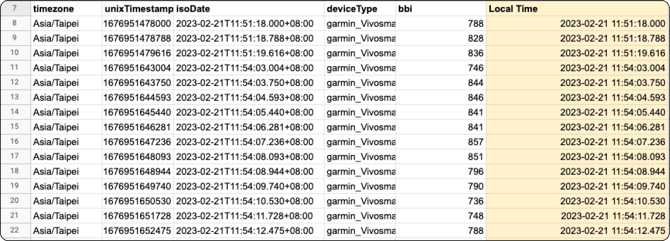
The first option is also the simplest. As you can see in the following image, the **isoDate** is the local time with the timezone indicated at the end. No formula is necessary.
.png?width=670&height=284&name=HC__Data__File__IsoDate%20(1).png)
#### Option 2: Derive the local time through timezone and unixTimestampinMs
Here we'll show how to manually convert the timestamp to a more readable format.
Ex: 1676951478000 → 2023/02/21 11:51:18
1. First, enter the following formula to covert from Unix timestamp to GMT+0: =**unixTimestampInMs**/1000/3600/24**+offsetInHour**/24+DATE(1970,1,1)
.png?width=655&height=70&name=HC__Data__File__Time-Calculation%20(1).png)
*In this example, you'd select B8 (unixTimestampinMs) and the offsetInHour is +8 (Asia/Taipei) so the formula is =**B8**/1000/3600/24**+8**/24+DATE(1970,1,1)*
2. Next, select the correct date formatting of the cell after converting from Unix timestamp to GMT+0.
In Excel:
1. 1. Select the cell
2. Select ‘Format Cells’ from the context menu
3. In the ‘Format Cells’ dialog box, under the ‘Number’ tab, click ‘Date’ in the Category list
4. Select the appropriate Date format you want (you can use YYYY/MM/DD h:mm:ss)
###### 📽️ How-To Video
Need additional support? View our example video using sample Labfront BBI data and Google Sheets.
---
### FAQs
#### **Why does Labfront use Unix time?**
The Unix timestamp is the number of seconds between a particular date and the Unix Epoch (Jan 1, 1970). Since this point in time technically does not change no matter where you are located on the globe, it's very useful for accurately comparing and manipulating dates and times across different platforms and time zones.
#### How do you handle daylight savings?
Our platform records data using both Unix time and local time. Unix time remains unchanged by daylight savings, providing a consistent reference point. For local time, our datetime converter automatically accounts for daylight savings adjustments (e.g., recognizing that March 10 has 23 hours instead of 24). While our system is designed to handle these transitions seamlessly, we recommend reviewing your data after daylight savings changes and reaching out if you notice any discrepancies.
#### **Do you offer any services to help analyze the data?**
We do! Our team of experts has over 20+ years of experience in digital biomarkers and research analytics. You can outsource your analytics to us and save up to several months of work. [Learn more about Labfront Analytics here](https://www.labfront.com/research/data-analytics).
#### **Can I see a sample of the downloadable data format?**
You sure can! Take a look at a [sample of our data here](https://drive.google.com/drive/u/4/folders/1F01qKLT_1xywQyCbuwUf-wXi2Fg7TpxC).
- [Getting Started](https://help.labfront.com/getting-started?hsLang=en#main-content)
- [Getting Started FAQs](https://help.labfront.com/getting-started?hsLang=en#getting-started-faqs)
- [Getting Started with Labfront Guide for Researchers](https://help.labfront.com/getting-started?hsLang=en#getting-started-with-labfront-guide-for-researchers)
- [Using Labfront](https://help.labfront.com/using-labfront?hsLang=en#main-content)
- [Project Creation, Setup and Edits](https://help.labfront.com/using-labfront?hsLang=en#project-creation-setup-and-edits)
- [Workspace](https://help.labfront.com/using-labfront?hsLang=en#workspace)
- [Participant Management](https://help.labfront.com/using-labfront?hsLang=en#participant-management)
- [Participant App](https://help.labfront.com/using-labfront?hsLang=en#participant-app)
- [Users and Accounts](https://help.labfront.com/using-labfront?hsLang=en#users-and-accounts)
- [Participant Experience](https://help.labfront.com/using-labfront?hsLang=en#participant-experience)
- [Garmin](https://help.labfront.com/garmin?hsLang=en#main-content)
- [General](https://help.labfront.com/garmin?hsLang=en#general)
- [Using Device](https://help.labfront.com/garmin?hsLang=en#using-device)
- [Movesense](https://help.labfront.com/movesense?hsLang=en#main-content)
- [General](https://help.labfront.com/movesense?hsLang=en#general)
- [Using Device](https://help.labfront.com/movesense?hsLang=en#using-device)
- [Data](https://help.labfront.com/movesense?hsLang=en#data)
- [Dexcom](https://help.labfront.com/dexcom?hsLang=en)
- [Data Metrics and Analysis](https://help.labfront.com/data-metrics-and-analysis?hsLang=en#main-content)
- [Data Management](https://help.labfront.com/data-metrics-and-analysis?hsLang=en#data-management)
- [Data Metrics](https://help.labfront.com/data-metrics-and-analysis?hsLang=en#data-metrics)
- [Data Analytics](https://help.labfront.com/data-metrics-and-analysis?hsLang=en#data-analytics)
- [Analytics Reports](https://help.labfront.com/data-metrics-and-analysis?hsLang=en#analytics-reports)
- [Pricing, Plans and Payment](https://help.labfront.com/pricing-plans-and-payment?hsLang=en)
- [Legal and Security](https://help.labfront.com/legal-and-security?hsLang=en)
- [Participant Resources](https://help.labfront.com/participant-resources?hsLang=en#main-content)
- [Participant Guides](https://help.labfront.com/participant-resources?hsLang=en#participant-guides)
- [Supporting Resources](https://help.labfront.com/supporting-resources?hsLang=en#main-content)
- [Grants, Funding and IRB Applications](https://help.labfront.com/supporting-resources?hsLang=en#grants-funding-and-irb-applications)
[](https://www.labfront.com)
Boston, MA, USA
[mailto:support@labfront.com](mailto:support@labfront.com)
Copyright © 2026, Labfront
```json
{
"@context" : "https://schema.org",
"@type" : "VideoObject",
"contentUrl" : "https://8585895.fs1.hubspotusercontent-na1.net/hubfs/8585895/Convert%20from%20Unix%20Time.mov",
"dateModified" : "2023-03-20T08:15:34.497Z",
"duration" : "PT32.517S",
"height" : 914,
"name" : "Convert from Unix Time",
"thumbnailUrl" : "https://8585895.fs1.hubspotusercontent-na1.net/hubfs/8585895/Convert%20from%20Unix%20Time.mov/medium.jpg",
"uploadDate" : "2023-03-20T08:15:25.925Z",
"width" : 1364
}
```