---
title: Workspace Settings
description: Workspace settings give you a high-level overview of your workspace and can be edited depending on your permissions.
---
[Skip to content](https://help.labfront.com/workspace-settings#main-content)
[Contact Support](https://help.labfront.com/kb-tickets/new?hsLang=en)
[](https://www.labfront.com)
- [Sign In](https://app.labfront.com/)
- [Back to Website](https://www.labfront.com/)
Open main navigation
Close main navigation
- [Sign In](https://app.labfront.com/)
- [Back to Website](https://www.labfront.com/)
- [Contact Support](https://help.labfront.com/kb-tickets/new)
How can we help you?
- There are no suggestions because the search field is empty.
1. [Help Center](https://help.labfront.com/?hsLang=en)
2. [Using Labfront](https://help.labfront.com/using-labfront?hsLang=en)
3. [Workspace](https://help.labfront.com/using-labfront?hsLang=en#workspace)
# Workspace Settings
## Workspace settings give you a high-level overview of your workspace and can be edited depending on your permissions.
#### - 👨🔬For Researchers -
You can manage a workspace in **workspace settings**. Here you'll be able to view the name of the workspace, which plan it's on, how many participants can be added, and its collaborators.
**Note**
Your editing permissions in the workspace settings depend on your role (owner, admin, editor, viewer).
[Learn more about workspace collaborator permissions→](https://help.labfront.com/manage-collaborators?hsLang=en)
To access the **Workspace Settings**:
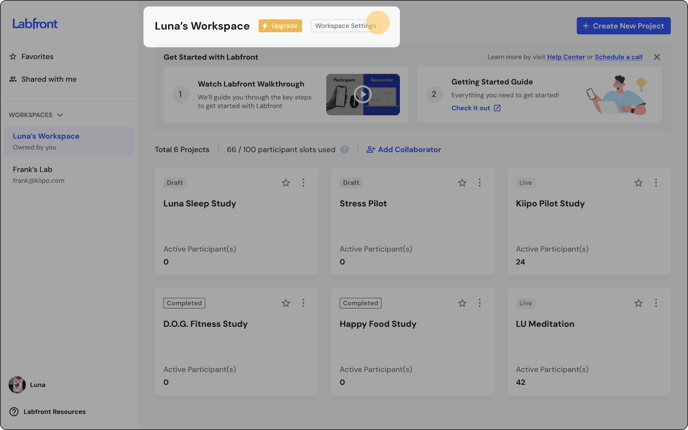
1. Select **Workspace Settings** from the top of the workspace.
2. Now you'll land in **Workspace Settings.**
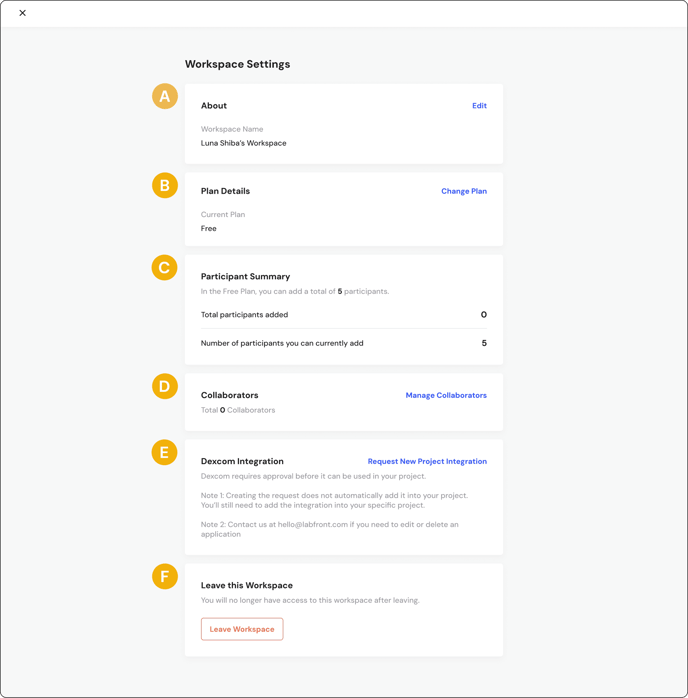
Workspace Settings are broken down into the following sections:
1. 1. **About** - Rename your workspace
2. **Plan Details** - Change your [Labfront plan](https://labfront.com/pricing)
3. **Participant Summary** - View how many participants you have added and how many you can still add
4. **Collaborators** - Manage the [collaborators](https://help.labfront.com/manage-collaborators?hsLang=en) of your workspace
5. **Dexcom Integration** - View current [Dexcom integrations](https://help.labfront.com/add-dexcom-to-labfront?hsLang=en) and request new ones
6. **Leave this Workspace** - If you'd no longer like access to the workspace *(Note: Workspace owners cannot leave a workspace)*
---
### Workspace Settings FAQs
#### **Can I upgrade my plan from workspace settings?**
Not yet. If you'd like to upgrade your workspace, please click the **Upgrade** button at the top of your workspace and fill out the form, or send an email to [support@labfront.com.](mailto:support@labfront.com)
#### **How can I switch between workspaces?**
This article takes you through [how to switch workspaces](https://help.labfront.com/switch-between-workspaces?hsLang=en).
#### How can I remove myself from a workspace (as a collaborator)?
To remove yourself as a collaborator, go to **Workspace Settings** \> **Leave Workspace**.
*(Note: Workspace owners cannot leave a workspace)*
- [Getting Started](https://help.labfront.com/getting-started?hsLang=en#main-content)
- [Getting Started FAQs](https://help.labfront.com/getting-started?hsLang=en#getting-started-faqs)
- [Getting Started with Labfront Guide for Researchers](https://help.labfront.com/getting-started?hsLang=en#getting-started-with-labfront-guide-for-researchers)
- [Using Labfront](https://help.labfront.com/using-labfront?hsLang=en#main-content)
- [Project Creation, Setup and Edits](https://help.labfront.com/using-labfront?hsLang=en#project-creation-setup-and-edits)
- [Workspace](https://help.labfront.com/using-labfront?hsLang=en#workspace)
- [Participant Management](https://help.labfront.com/using-labfront?hsLang=en#participant-management)
- [Participant App](https://help.labfront.com/using-labfront?hsLang=en#participant-app)
- [Users and Accounts](https://help.labfront.com/using-labfront?hsLang=en#users-and-accounts)
- [Participant Experience](https://help.labfront.com/using-labfront?hsLang=en#participant-experience)
- [Garmin](https://help.labfront.com/garmin?hsLang=en#main-content)
- [General](https://help.labfront.com/garmin?hsLang=en#general)
- [Using Device](https://help.labfront.com/garmin?hsLang=en#using-device)
- [Movesense](https://help.labfront.com/movesense?hsLang=en#main-content)
- [General](https://help.labfront.com/movesense?hsLang=en#general)
- [Using Device](https://help.labfront.com/movesense?hsLang=en#using-device)
- [Data](https://help.labfront.com/movesense?hsLang=en#data)
- [Dexcom](https://help.labfront.com/dexcom?hsLang=en)
- [Data Metrics and Analysis](https://help.labfront.com/data-metrics-and-analysis?hsLang=en#main-content)
- [Data Management](https://help.labfront.com/data-metrics-and-analysis?hsLang=en#data-management)
- [Data Metrics](https://help.labfront.com/data-metrics-and-analysis?hsLang=en#data-metrics)
- [Data Analytics](https://help.labfront.com/data-metrics-and-analysis?hsLang=en#data-analytics)
- [Analytics Reports](https://help.labfront.com/data-metrics-and-analysis?hsLang=en#analytics-reports)
- [Pricing, Plans and Payment](https://help.labfront.com/pricing-plans-and-payment?hsLang=en)
- [Legal and Security](https://help.labfront.com/legal-and-security?hsLang=en)
- [Participant Resources](https://help.labfront.com/participant-resources?hsLang=en#main-content)
- [Participant Guides](https://help.labfront.com/participant-resources?hsLang=en#participant-guides)
- [Supporting Resources](https://help.labfront.com/supporting-resources?hsLang=en#main-content)
- [Grants, Funding and IRB Applications](https://help.labfront.com/supporting-resources?hsLang=en#grants-funding-and-irb-applications)
[](https://www.labfront.com)
Boston, MA, USA
[mailto:support@labfront.com](mailto:support@labfront.com)
Copyright © 2026, Labfront